In principle, there are two different types of reports for the user:
-
Simple reports (SimpleReports)
-
The complete HTML report (HtmlReportCreator)
Simple Report
From any extent, a simple report about the current view can be generated by selecting the 'Create Report' menu.
TODO: IMAGE
Alternatively, the user can create an instance of the 'SimpleReportConfiguration' element. In the detail view of the element, a 'Create Report' button is created. Through this, the user can then select the extent or the element over which the report is to be generated.
TODO: Image
A random file is created on the hard drive, which is then displayed via the default browser.
Configuration
The simple report is configured via the SimpleReportConfiguration:
| Name | Description |
|---|---|
name |
Name of the configuration |
rootElement |
The root element whose properties are to be displayed. |
showDecendents |
true if its children should also be displayed |
showRootElements |
true if the root elements should be displayed |
showMetaClasses |
true if a column should be automatically inserted showing the metaclass of the objects |
showFullName |
true if a column should be inserted showing the path (full name) to the object |
form |
If no automatic form is to be generated, a form can be specified here. This must be of type ListForm. |
descendentMode |
None, Inline, PerPackage |
typeMode |
PerType, AllModes |
The DescendentMode determines whether a new table should be created in the report for each package.
The TypeMode determines whether a new table should be created in the report for each type.
The HTML Report
A report is defined via two configurations:
-
Via a ReportDefinition, the user can define the format and elements of the report. This is not yet coupled with the data sources.
-
The actual report is then instantiated via the ReportInstance. Here, the data sources are linked with the Report Definition.
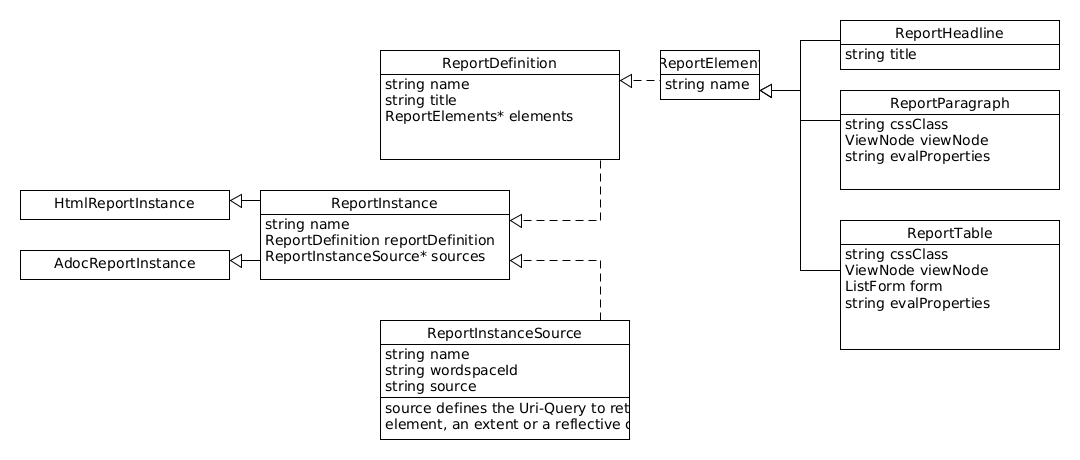
Report Definition
Report Instance
The Report Instance consists of a reference to the ReportDefinition and the sources of the data. These connect the name of the source to a URL via which the DatenMeister reads the data.
The resolution of the URL in the source is done with the help of the WorkspaceResolver of the corresponding workspace.
Definition ReportInstance:
name |
Name of the report instance |
reportDefinition |
Reference to the definition of the report |
sources |
Collection of ReportInstanceSources that allow the user to specify different sources per report. |
HtmlReportInstance
Derived from ReportInstance and enables the export of an HTML document from the ReportDefinition.
AdocReportInstance
Derived from ReportInstance and enables the export of an ADoc document from the ReportDefinition.
ReportInstanceSource
name |
Name of the source |
url |
URL to reference the extent, the collection, or the object. |
ReportParagraph:
Expresses a paragraph in the report. This can contain a static text or be generated dynamically via evalParagraph or evalProperties.
| name | Name of the element |
|---|---|
paragraph |
Default text that is displayed |
viewNode |
If evaluation takes place, the ViewNode query describes which object was selected. The selected object is available via the instance 'i' in the parsers. |
cssClass |
CSS class of the table |
evalParagraph |
Set if the paragraph text is generated dynamically. |
evalProperties |
Set if the template parser is to be used to change the properties of the view. The definition of the paragraph itself is accessible via 'v'. |
ReportTable
Describes a table that expresses the elements of a ViewNode. The columns of the table are defined via a form definition.
| name | Name of the element |
|---|---|
viewNode |
Describes the dynamic query that selects the elements to be displayed in the table |
form |
Defines the form. This form should be instantiated from the type ListForm. |
cssClass |
CSS class of the table |
evalProperties |
Performs an evaluation. The elements themselves are accessible via 'items'. |
Table Cell of EvalTextFieldData
A table cell supports the following properties:
| name | Name of the element |
|---|---|
text |
Text content of the cell |
cssClass |
In the case of the HTML report, the CSS class of the cell |